How Fig2Shop closes the gap between a finished Figma design and a live, editable Shopify Online Store 2.0 section - what it actually does, why it's structured the way it is, and where it fits for D2C brands and agencies.
There's a quiet tax every D2C brand pays between Figma and Shopify, and almost no one accounts for it on a P&L.
A designer finishes a beautiful PDP, a campaign landing page, or a new collection hero in Figma. It's pixel-perfect, on-brand, ready to ship. Then it sits. For one week. Two weeks. Sometimes a quarter - waiting for a developer to translate it into Liquid, or for an agency to schedule the handoff, or for the founder to lose interest because their best traffic just rolled past with the old page still live.
We built Fig2Shop to remove that translation layer entirely. You paste a Figma link, and you get back a real, editable Shopify Online Store 2.0 section - deployed straight into your theme, with live product data bound to it. Below is the deep-dive: what it actually does, why it's designed the way it is, and where it fits.
Why the Figma → Shopify gap has resisted automation for so long
On the surface, "design to code" looks like a generic AI-rendering problem - many tools generate React or HTML from Figma. The Shopify version is harder, and the difference matters.
A Shopify section isn't just markup. It's a small, opinionated piece of software that has to: render server-side via Liquid, expose schema settings the merchant can edit inside the theme editor, bind to live product / collection / metaobject data, work inside any of a hundred parent themes (Dawn, Impulse, Prestige, Symmetry, custom builds), respect each theme's asset pipeline, and degrade gracefully on every breakpoint.
Generic "Figma → HTML" output fails every one of those constraints. It produces a static page, not a theme-editor-editable section. Merchants can't change the headline without re-running the AI. The output ignores Liquid objects entirely and hard-codes product data, which is exactly the wrong outcome - your store has to keep working when a SKU changes.
The hard part of Fig2Shop isn't reading Figma. It's producing output that behaves like a real Shopify section a real merchant can actually live with.
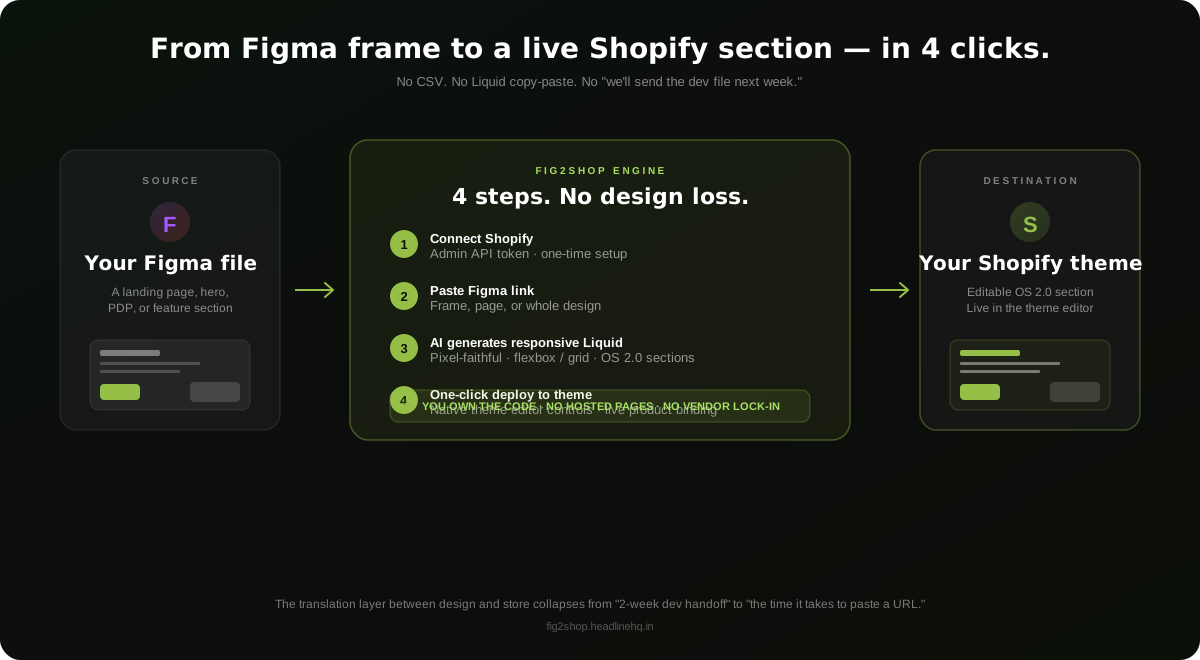
The four-step workflow, in real detail
1. Connect your store (one-time)
You install Fig2Shop and authorise it against your Shopify store with an Admin API token. This is what lets the tool deploy generated sections back into your theme automatically - no copy-pasting Liquid into the admin, no SFTP dance. It's a one-time setup; after that, every future generation flows back to the same store.
2. Paste a Figma link
A single frame URL is enough - a hero, a feature row, a testimonial grid, a full landing page. The tool reads the file via Figma's public API, including layout (auto-layout, constraints), typography, colour tokens, images, and component structure. No "download the file as PDF" workaround, no plugin install required.
3. The AI reconstructs it as responsive Liquid
This is where the heavy lifting happens. The engine maps Figma's layout primitives to CSS flexbox and grid, preserving spacing, alignment, and the breakpoint behaviour the designer intended. It separates content (headlines, body copy, button labels, image slots) from structure (the section's schema settings) - so what comes out is an Online Store 2.0 `.liquid` file with a real `{% schema %}` block that exposes every editable field to the theme editor.
For anything that should be live data - product cards, collection feeds, blog rolls - the engine generates Liquid object bindings (`{{ product.title }}`, `{{ collection.products }}`, metaobject queries) rather than hard-coded text. Your section stays correct when a SKU is renamed.
4. One-click deploy to your theme
The generated section ships directly to your store as a new theme file. Open the theme editor, drop it onto any page, and edit it like any native section. No GitHub PR, no theme code surgery - but the code is yours, sitting in `sections/` in your theme, and you can edit it by hand at any time.
You don't end the workflow holding a screenshot. You end it with a section in your theme, editable by anyone with theme-editor access.
Why "Online Store 2.0 sections" is the right unit of output
Most Figma-to-Shopify attempts produce one of two wrong things: a hosted landing page that lives outside your theme, or a single locked-down template file. Both create downstream pain.
- Hosted pages mean a separate URL, a separate codebase, no theme editor, no SEO consolidation with the rest of your store, and a vendor that can change pricing or shut down tomorrow. You don't own anything.
- Static template files are uneditable for non-developers. Every typo fix needs the original tool. The marketing team is permanently dependent.
A proper Online Store 2.0 section is the cleanest middle ground. It sits inside your theme. It exposes schema settings, so any team member can edit headlines, image slots, button labels, and product picks from inside Shopify's native UI. It can be reordered, duplicated, A/B tested, hidden, and rebranded - all without touching code. And because the code is in your theme, you can hand it to any Shopify developer to extend or fork.
That alignment with how Shopify actually wants merchants to work is the difference between a tool people demo and a tool people live with.
Why "you own the code" matters more than people realise
Every hosted page-builder in the Shopify ecosystem has a quiet trap: the moment you stop paying, your page either disappears or becomes uneditable. Some of them inject runtime JavaScript that proxies your traffic through their CDN. Others render content via an iframe. Either way, the page is theirs; you're renting.
Fig2Shop outputs straight to your theme repo. The section file is yours. The code is yours. If you cancel the subscription, the section keeps working forever - there is no proxy, no runtime call back to a Fig2Shop server, no feature gate that disables your live page on day 31.
For brands that have been burned by page-builder lock-in (and almost every D2C team over five years old has been), this is the line that gets the call started. Code ownership isn't a feature; it's a different relationship with the tool.
The agency angle (and why it's sharper than it looks)
For agencies serving multiple Shopify clients, the bottleneck is rarely the design - it's the implementation hours. A new client wants a landing page; the senior dev says "next sprint"; the campaign window closes; the client is unhappy; the agency loses margin to overtime or external contractors.
Fig2Shop collapses that. The same designer who built the Figma file now ships the section directly, the same afternoon. Implementation becomes pasting a URL, a quick smoke test in the theme editor, and a handover. The senior dev is free to do the things only a senior dev can do - performance audits, custom apps, headless rebuilds - instead of being a JIRA bottleneck for every hero rebuild.
Fig2Shop ships with a white-label option for agencies that want their own branding on the workflow. The economics matter: at $19/month for the Pro tier (15 generations), one delivered landing page pays for it many times over against the alternative of $800–$2,500 in dev hours per section.
Who this is actually for
- D2C founders who design in Figma and want their store to keep up with their marketing calendar - campaign pages, drop landing pages, seasonal heroes, PDP refreshes.
- Designers who are tired of finishing a beautiful design only to watch it sit in someone's ticket queue. Now the same person closes the loop.
- Agencies with 5+ Shopify clients who want to compress per-section delivery from a multi-day dev cycle to an in-meeting demo.
- Solo operators / Shopify side-hustles who need a real Shopify storefront but don't want to learn Liquid or pay agency rates for every section.
How it sits next to the rest of the HeadlineHQ toolkit
Fig2Shop is one of the products this studio builds and runs, and these ones sit next to each other across a real operating workflow for a D2C store. The full list is on the apps page, counted a row per product with a link each:
- LineDrop - get the catalog into Shopify without a CSV (linesheet → products + images).
- Fig2Shop - get the design into Shopify in 4 clicks (Figma → section).
- ProfitOS - get the real, RTO-adjusted profit on WhatsApp every morning.
- AutoBD - get the next ten clients into the pipeline, automated and personalised.
Each one was built because we kept watching the same operating costs hit our clients' P&Ls - manual catalog work, design handoff delays, month-end profit blind spots, and outbound that drained the founder's week. Fig2Shop is the design-handoff one, and it's already changing the way our team ships landing pages for clients.
Want to try it on a real Figma frame? The free tier covers one page generation - enough to see whether the output is actually useful for your store.
Try Fig2Shop freeWhere to go next
If you're building a new landing page this week, run it through Fig2Shop and compare it to your current handoff workflow. If you're an agency, try it on a smaller client first - somewhere the per-section ROI is the easiest to see. If you've been burned by page-builder lock-in before, read the deployed Liquid file: it's yours, sitting in your theme, with no runtime call to anyone.
The Figma → Shopify gap was a quiet tax for years. It doesn't have to be anymore.
Frequently asked
How is Fig2Shop different from page-builder apps like Pagefly, GemPages, or Shogun?
Page builders give you a hosted page that lives in their system - usually rendered by their runtime, served from their CDN, and editable only inside their UI. When you cancel, the page typically stops working or becomes uneditable. Fig2Shop outputs an Online Store 2.0 .liquid section that gets committed straight to your theme. You own the code. You can edit it in the native Shopify theme editor with no Fig2Shop login. If you cancel, the section keeps working forever - there's no runtime dependency on Fig2Shop after deploy.
Will the AI output actually look like my Figma design, or is it a rough approximation?
The engine maps Figma's auto-layout, constraints, typography, and colour tokens to CSS flexbox and grid, so the output is pixel-faithful to the source frame at the breakpoint it was designed for, and responsive across mobile / tablet / desktop. It is not a "rough sketch" tool - the goal is a deployable section, not a starting point you still have to rebuild. For unusual custom interactions (parallax, complex animations, third-party widgets), you may still want a developer pass, but the layout, copy, imagery, and basic UI all come through clean.
Does Fig2Shop work with any Shopify theme?
Yes - the output is a standard Online Store 2.0 section, which any modern OS 2.0 theme supports (Dawn, Impulse, Prestige, Symmetry, Empire, and most custom themes built in the last two years). Older Vintage themes that haven't been upgraded to OS 2.0 don't support sections-on-every-page, so the deploy step won't work cleanly there - but those themes are a shrinking minority on the platform.
What happens to product data - does it stay live, or does it get baked into the section?
Live data bindings. Any section that surfaces product cards, collection feeds, blog rolls, or metaobject content gets generated with the corresponding Liquid object bindings ({{ product.title }}, {{ collection.products }}, {{ shop.metaobject }}, etc.) rather than hard-coded text or images. So when you rename a SKU or add a new product to a collection, the section updates the way every other native Shopify section does.
Is this useful for agencies, and what does the white-label option include?
Yes - arguably more useful for agencies than for single-brand founders, because every per-client section saved compounds across the book. The Agency tier includes a white-label option so the workflow ships under your own brand to your clients, multi-store management, and custom pricing for higher generation volumes. Most agencies pay back the subscription in the first delivered section.